Staking on Hex Safe
How can I stake on Hex Safe?
-
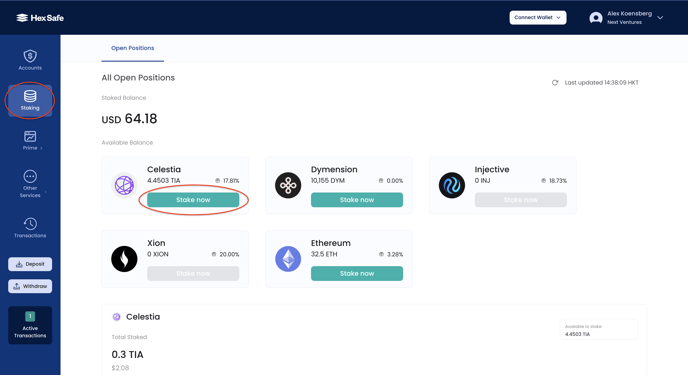
Navigate to Staking: Access the "Staking" section within Hex Safe.
-
Choose Your Stake: Click the "Stake Now" button for your desired asset.
-
Define Stake Parameters:
- Select the asset to stake
- Choose the network for staking
-
Specify the vault funding the stake
-
Add Stake Details:
- Enter your token amount (ETH stakes must be multiples of 32 ETH)
- Review and accept the terms and conditions
-
Click "Stake"
-
Confirmation: Verify all details (amount, validator, network) and click "Confirm Staking"
-
Authenticate via Mobile App: Confirm the staking transaction in your Hex Safe Mobile App
-
Approval: Users with Approver role provide final approval on the Mobile App
How can I Unstake on Hex Safe?
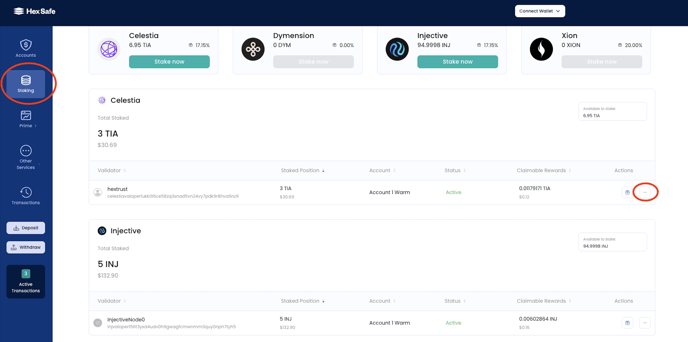
- Access Staking Positions: Navigate to the "Staking" section
- Find Your Stake: View your current staking positions
- Initiate Unstake: Click the "..." button on the stake entry and select "unstake"
- Confirm Details: Verify asset, network, and vault information; click "Continue"
- Choose a Validator: Select your unstaking validator
- Review and Confirm: Click "Confirm Unstake"
- Authenticate via Mobile App: Confirm in your Hex Safe Mobile App
- Approval: Approvers provide final approval
How can I claim my rewards on Hex Safe?
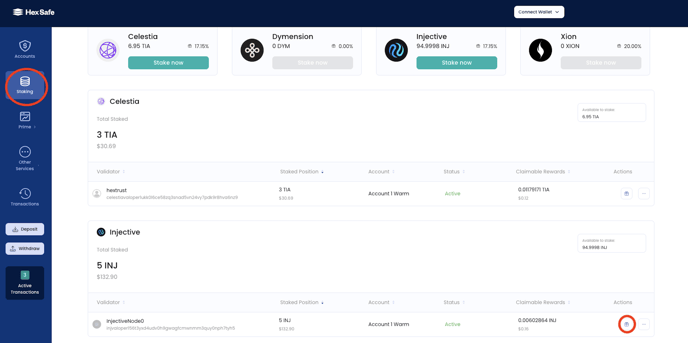
- Access Staking Positions: Navigate to "Staking"
- Identify Rewards: Review your staking positions
- Claim Rewards: Click the gift icon on the stake entry and select "Claim Rewards"
- Confirm Claim Details: Verify asset, network, and vault; click "Continue"
- Choose Validator: Select the validator
- Review and Confirm: Click "Confirm Claim Rewards"
- Authenticate via Mobile App: Confirm in your Hex Safe Mobile App
- Approval: Approvers provide final approval